Skip to content

The assistant shows every change before it savesProfessional plan

From customer request to finished task, in one place.

A form keeps each customer inquiry as a response. Orchido can link it to the customer and open the follow-up task, on its own or after someone reviews it.

See pricing
  • 14-day free trial
  • No credit card required
  • Every Professional feature during the trial

One working day in Orchido, in four chapters

  1. Stock alerts (Professional plan): An item drops below its minimum stock, and a new reorder rule lets Orchido draft the next purchase order.
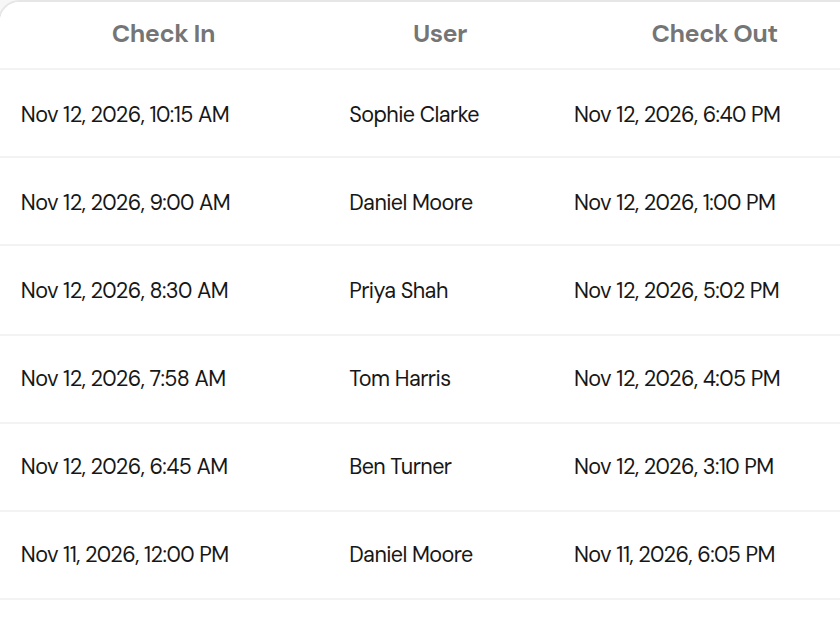
  2. NFC check-in (Professional plan): A team member taps their NFC tag, and the attendance view shows them as checked in.
  3. Time off: A time off request is approved, and the schedule shows who is away that week.
  4. Tasks and assistant (Professional plan): The assistant proposes a task, you confirm it, and the card appears on the task board.

A sample day in an Orchido workspace

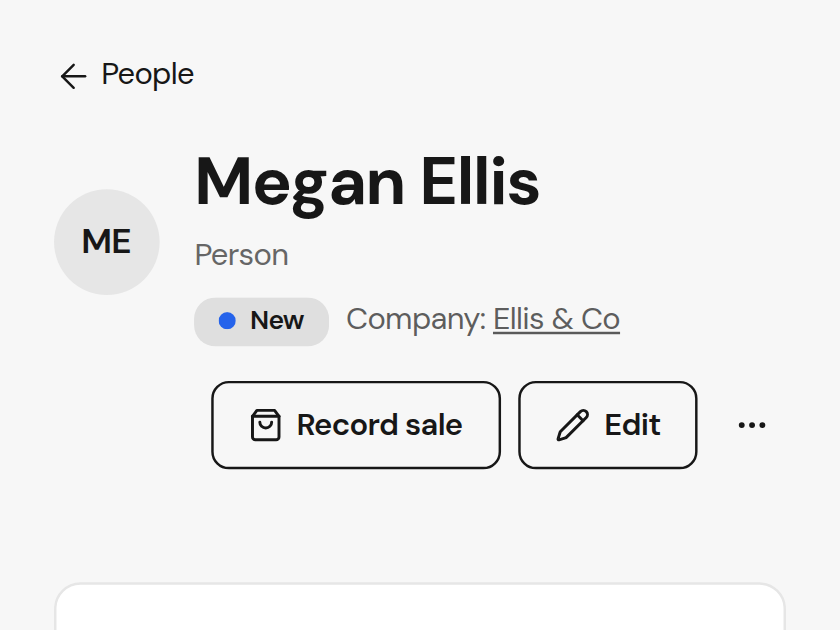
Orchido customer profile for Megan Ellis, a person at Ellis & Co.

Customers

People and companies with their notes, tasks and sales in one profile. Customers fill in your forms without an account, and every response is kept.
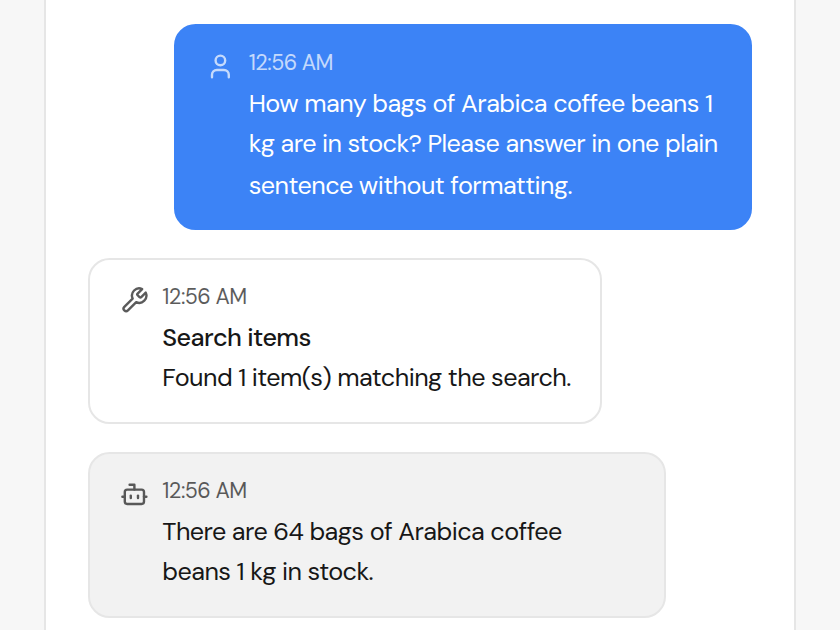
Orchido assistant chat: asked how many bags of Arabica coffee beans are in stock, it replies with the current stock level.

AI assistantProfessional plan

Ask in plain words for stock levels or a change to a task. The assistant shows what it will do, and nothing changes until you confirm.

Shift planning

Set up shift templates once and assign them from a start date. Change a single day when it runs differently.

Tasks

Shared boards where every task has an owner, a due date and a priority. Cards move across the board until they are done.

NFC check-inProfessional plan

Your team checks in and out by scanning a tag where work starts. Each scan lands in Attendance History.

Orchido sale detail for Megan Ellis: six bags of Arabica coffee beans at €18.50 each, with the sale's ST reference.
The recorded sale with its reference, customer and quantity.
Transactions tab of Megan Ellis's profile, listing the sale with the same ST reference and a quantity of six.
The same sale in the customer's Transactions tab.
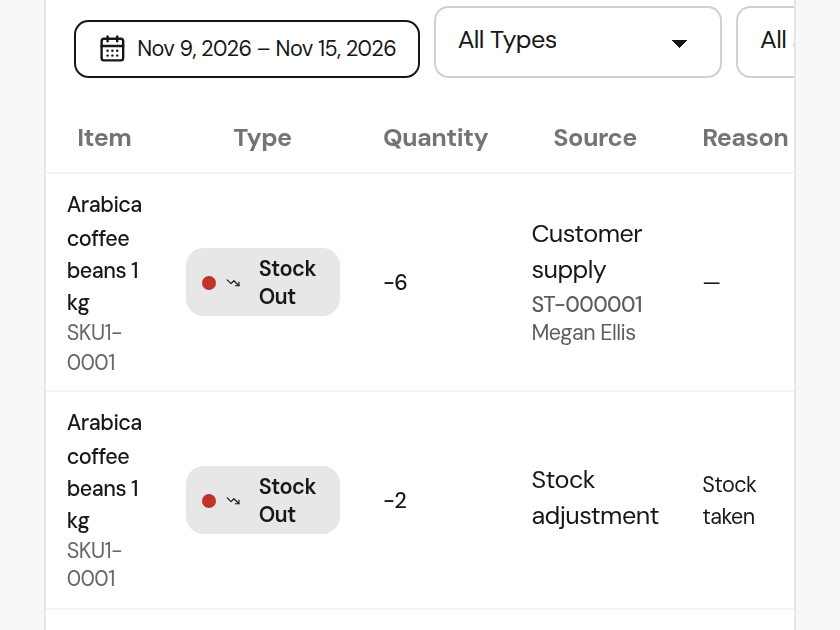
Stock activity row for Arabica coffee beans: Customer supply to Megan Ellis, six bags out, with the same ST reference.
The stock movement, labelled Customer supply, with the same reference.

Sales and stock

Record a sale once and both sides agree.

Your team records the sale from the customer's profile or the item list. The customer's transactions and the stock movement then carry the same ST reference and quantity.

Orchido assistant chat with the request: move "Count the bean stock in the back room" to In progress.
The request to move a task to In progress.
Confirmation dialog for "Count the bean stock in the back room" showing the status change from To do to In progress, with Confirm and Cancel.
The confirmation names the task and its status, from To do to In progress.
The task "Count the bean stock in the back room" in the In progress column of the Daily operations board, still assigned to Tom Harris.
After you confirm, the task sits in In progress.

Assistant and tasks

Ask for the change, then say yes to it.

Ask the assistant to move a task along, and it proposes the change: the task and its status before and after. Nothing changes until you confirm, and then exactly that change is made.

Professional plan

Starter

For a small team moving stock and attendance out of the spreadsheet.

€79/mo

Net price plus applicable taxes.

Billed monthly per organization.

  • Up to 5 team members
  • Items, categories and low-stock reporting
  • Attendance and time-off requests
  • Suppliers and purchase orders
  • Report exports as CSV, item exports as CSV or JSON
Start Starter

Professional

Recommended

For a growing team that wants the routine handled and the final say kept.

€169/mo

Net price plus applicable taxes.

Billed monthly per organization.

  • Everything in Starter
  • Unlimited team members
  • Lot and expiry tracking
  • NFC check-ins and check-outs
  • AI assistant and document understanding
  • 2M AI assistant tokens per month
  • Reorder rules that draft the purchase order for you
Start Professional

Complete

Everything in Professional, with accounting still to come.

Coming soon

Not on sale yet. Tell us what you'd need from it.

  • Everything in Professional
  • Accounting and bookkeeping exportsPlanned
  • Unlimited AI assistant usage
Talk to sales
How do we get started?
Start the free trial. It takes no card, and for 14 days your organization runs on everything Professional includes. Add your items, invite your team with a role for each person, and publish a form when you want customer requests to come in.
What does Orchido cover?
Customer requests through forms, customer records and their sales, tasks on shared boards, stock with suppliers and purchase orders, and your team's attendance, time off and shifts. Lot and expiry tracking, NFC check-in and the assistant start on the Professional plan.
Who can review form responses and act on them?
By default, owners and department leads review responses: they link the customer, add the note and create the task. Members can read responses, and only owners can delete one. An owner can change these permissions for each role.
What does Starter leave out?
Starter runs inventory, attendance, time off, suppliers and purchase orders for up to 5 people, with low-stock reporting included. It leaves out lot and expiry tracking, NFC check-ins, reorder rules that draft a purchase order, and the AI assistant with its document understanding. Those start on the Professional plan.
Is the AI assistant included?
It comes with the Professional plan, which includes 2 million assistant tokens a month; Starter has none. It can look up items, stock levels and tasks, create or update an item, adjust or move stock, draft a purchase order, open or complete a task, propose a change to an existing task, and file a time-off request. It doesn't produce reports and doesn't set up reorder rules.
Can the assistant change data without asking?
No. Anything it wants to change is shown to you first, with every detail it would use, and nothing happens until you confirm. Confirming runs it once no matter how many times you click, and a proposal you ignore expires instead of running. The assistant comes with the Professional plan.
How does NFC check-in work?
It starts on the Professional plan. Assign a tag to a person and a tap checks them in or out. The tap lands on the same record a manual entry would, so the day reads the same however it was captured.
What happens when the trial ends?
The 14-day trial runs on everything Professional includes, and starting it takes no card. If it ends without a subscription, the account goes read-only for a grace period: everything stays readable and your team can still check in and out, but nothing else can change. After that it locks until you subscribe.
Can we get our data out?
Yes. Inventory exports as CSV or JSON. Valuation, aging, movements and low-stock reports export as CSV, and so does per-person attendance. There's no XLSX or PDF export, and no accounting integration yet. Before an account is deleted, support can provide a complete copy of the organization's data on request; it isn't an in-app download.

Your first week

Put this week's requests through it.

Publish a form, add your stock and your team, and watch the work move between them. 14 days free on everything Professional includes, no card.